 Games
Games  Promotions
  Search
  Deposit
WinBeast App for Mobile Devices
Players can enter the WinBeast online casino on desktop and mobile devices. You can open the platform on your browser or download the WinBeast Casino mobile app. We have a native application that you can download from the Play Store and App, and a Progressive Website Application (PWA) that you can install from your browser menu and have access to more than 8,000 games.
Whichever you install, you will get a platform that is well-designed, user-friendly, and optimised for mobile use. From your mobile device, you can register, claim bonuses, deposit funds, and play all games and tournaments, just like on the desktop version. The app is free to download and it is compatible with most modern devices like iPhone 17 and Samsung S24, and even earlier versions like iPhone 11 and Samsung Galaxy S21 FE.
How to Use the Application
The WinBeast Casino app is designed to be fully functional. As such, you don’t have to switch between the app and the desktop version to complete some functions. One of the first things you can do on the Win Beast Casino app is create your account. If you have one, log in. Use the same email and password that you use to log in on your desktop or mobile browser.
Users can verify their accounts via the Win Beast app. It is actually easier than verifying on a desktop because you can easily take a picture or screenshot of the required document and upload it.
We have over five weekly bonuses, which you can claim on your phone. You will be the first to know about a new offer when you enable push notifications. The mobile WinBeast app has over 8,000 games, including Wild West Trueways, Disco Party, and Auto Roulette. You can play them without running into hitches or lags.
How to Use Casino WinBeast Mobile App and Install on Android
You can search for the Win Beast Casino mobile software on Google Play Store, then install it or find the downloadable link on the left-side menu on our website. If none of these work, install the PWA. The steps include:
- Open the site on your Chrome or preferred browser.
- Tap the menu dot at the end of the URL.
- Find the Add to Home Screen option.
- Tap the Install or Add button. Your WinBeast mobile app should appear on your home screen in less than 3 seconds.
Our gaming application is ready to use. Connect your device to a stable internet, log in, and deposit funds. You can also play demo games without using your real cash.
How to Use and Install on iOS
One of the ways to download the WinBeast Casino app for your iOS devices is by following the link placed on the casino site. You can open the site on your Safari browser, then go to the menu to find the Install app page. Click the iOS link. You will be redirected to your App Store. Or you can download a PWA version, here is the alternative procedure:
- Open the casino site on your Safari browser.
- You will see the share button at the bottom. Tap to open the installation prompt.
- Tap the Install button to add the Casino Win Beast application to your home screen. You will be able to join live dealers to play Blackjack, Roulette, and other games. You can also deposit or withdraw your winnings.
WinBeast Mobile App Supported Devices
Players can access our platform on different devices. These include:
| Devices | Characteristics |
| Phone | The site is optimised for mobile browsers. It takes the layout of the desktop version. You can download the WinBeast app to access the site more conveniently. The phone should have Android 8+ or iOS 11+, 5,000+ mAh, 4GB RAM, 100+ ROM. |
| Tablet | You can use the browser or download the application. Tablets deliver an immersive gameplay with their 7+ screen display. Other important characteristics include a 5,000+ mAh battery. |
| PC | Should have at least 8GB RAM, a strong processor such as Intel Core i3 or the equivalent, and an SSD for quick loading. You will get a web view, and you can open multiple tabs to play several games simultaneously. |
WinBeast Casino App Interface
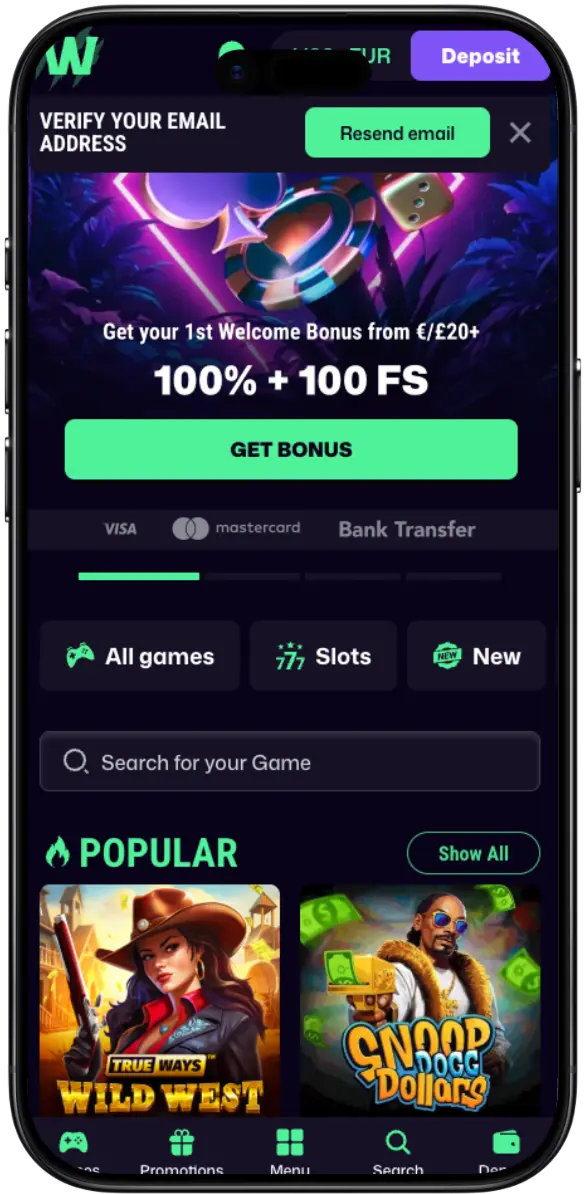
Our team designed a fully functional application with an easy-to-use interface. The first thing you will notice is the unique purple background. It is perfect for the olive green used all over the platform to highlight icons and important notifications. When you sign up or log in via Win Beast mobile app, you will find the deposit button at the top and another icon showing your balance in GBP. Below that are tabs that lead to different pages, such as All Games, Slots, Bonus Buy, and Live Casino. There is a drop-down tab that you can use to filter games by their developer.
We placed icons, such as Games, Promotions, Menu, Search, and Support, close to the chin of your phone. These will help you navigate the WinBeast Casino mobile app. You can quickly switch between sections by swiping or tapping the new tab or icon.
Account Registration and Deposit
You need a registered account to use the features on the WinBeast mobile app. The registration will only take you 2 minutes. But if you have already created it on the desktop version, you don’t need a second account. Here is how to register your account:
- Open the app on your phone and tap the Sign up Button.
- Fill in your email and create a password.
- Go to the next registration step and fill in your details, including your name, address, postal code, state, date of birth, and phone number.
- Read and accept our terms.
- Click the Send button.
Before continuing with the casino Win Beast mobile version, go to your email to find the email verification link from us and follow the instructions. Once your email is verified, return to the WinBeast app to deposit funds. Click the button at the top and choose your payment. Enter the details and complete the transaction.
Benefits of Using the WinBeast Mobile App
Our mobile application brings many benefits to our players. These include:
| Benefits | Details |
| Convenience | Our mobile platform is more accessible than the desktop version because you only need a phone to log in. You can access the site much quickly and from anywhere. |
| Usable | The platform is designed to maintain seamless usability. You can deposit, withdraw, chat with a customer agent, and play games on the WinBeast Casino app. The gameplay is immersive. You can get started on the app in a few minutes because it is easy to learn. |
| Access to the Actual Platform | The only difference between the app and the desktop/browser version is layout and personalisation. Both platforms share features, games, bonuses, and security features. |
Bonuses for Mobile App Players
We have bonuses for new and existing players. You can enable the push notifications button on your WinBeast mobile app to receive messages about new offers as soon as we release them. They include:
- Welcome Package: We have prepared a welcome combo of GBP 3,000 plus 300 free spins. The offer is shared among your first three deposits.
- Beast Boost Monday: This is a reload offer that you can claim every Monday. You only need to deposit GBP 20 to activate the 40% reload offer. You can get up to GBP 300.
- Beast Mode Wednesday: Every Wednesday, you can log in to your WinBeast Casino mobile app to claim an unlimited number of spins. You can get 20 spins every time you deposit GBP 20 or more during the day.
WinBeast App Security and Data Protection
WinBeast is fully licensed and regulated complying with strict UK standards for player protection and data security. You will appreciate the number of security measures we have implemented on the application. This includes the basic firewall to protect the servers and SSL encryption to protect user data. Players can enable 2-factor authentication, where they can get a code via phone while logging in.
The casino only uses secure payment gateways. That way, your transactions, whether deposits or withdrawals, are safe. We only partner with reputable game developers for quality and safe gaming. The casino has a team of IT experts that regularly analyse the WinBeast mobile app and upgrade some features to prevent data leakage or other security issues.